
Queue Monitor
Monitor background job queues — printing, fiscal submissions, and system events.
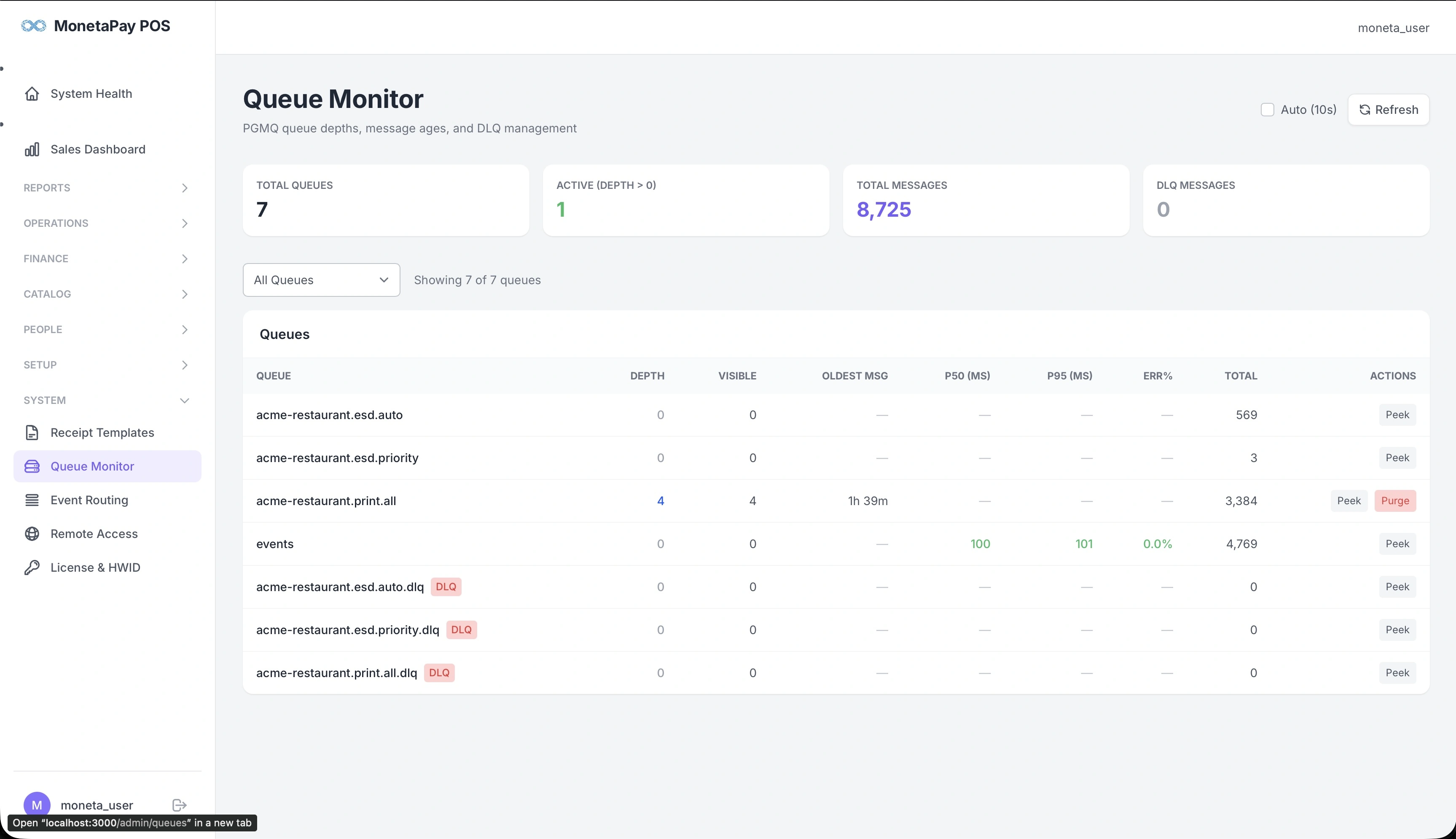
Overview
The Queue Monitor shows the health of your system's background job processing. Tasks like receipt printing and fiscal submissions happen automatically after each order — this page lets you verify they're processing normally and troubleshoot when they're not.
TIP
This page is available to Admin users only.
What You'll See
Summary Cards
| Card | What It Shows |
|---|---|
| Total Queues | Number of job queues in the system |
| Active (Depth > 0) | Queues with jobs waiting to be processed |
| Total Messages | All-time count of jobs processed |
| DLQ Messages | Jobs in dead-letter queues (failed processing) |
Controls
- Auto (10s) — toggle automatic refresh every 10 seconds
- Refresh — manually reload queue data
- Queue filter — filter to show all queues or a specific one
Queue Table
| Column | Description |
|---|---|
| Queue | Job queue name |
| Depth | Jobs waiting to be processed — should normally be 0 |
| Visible | Jobs available for workers to pick up |
| Oldest Msg | Age of the oldest waiting job — indicates backlog |
| p50 (ms) | Median processing time |
| p95 (ms) | 95th percentile processing time |
| Err% | Error rate |
| Total | All-time jobs processed |
| Actions | Peek messages, Purge queue |
Queue Types
| Queue Pattern | Purpose |
|---|---|
| events | Central event bus — all system events flow through here |
| *.print.all | Print jobs for configured printers |
| *.esd.auto | Automatic fiscal receipt submissions |
| *.esd.priority | Priority fiscal submissions (no delay) |
| *.dlq | Dead-letter queues — failed jobs that need attention |
Dead-Letter Queues (DLQ)
Jobs that fail processing repeatedly are moved to a DLQ (marked with a red DLQ badge). These jobs are preserved rather than lost.
Actions for DLQ queues:
- Peek — view the job content without consuming it
- Purge — permanently delete all jobs (use with caution)
To replay DLQ messages back to the main queue for reprocessing, use the queue's replay action.
TIP
Check DLQ queues regularly. A growing DLQ usually indicates a configuration issue (printer offline, fiscal service unreachable) rather than a software bug. Fix the underlying issue first, then replay the failed jobs.
What to Watch For
- Depth climbing — jobs arriving faster than they're being processed. Check that printers are online and services are reachable.
- High p95 — a slow printer or unreliable network connection.
- Err% above 0 — something is failing. Check DLQ for details.
- Oldest Msg growing — a worker may have stopped. Check the system services.