
Receipt Templates
Customize the format and content of printed receipts and kitchen tickets.
Overview
Receipt Templates control exactly what gets printed on your thermal printers. You can customize kitchen tickets, customer receipts, proforma invoices, and fiscal receipts — each with its own template.
Use this page to:
- View all configured receipt templates
- Create new templates for different purposes
- Edit template content and formatting
- Set default templates for each type
What You'll See
Template Types
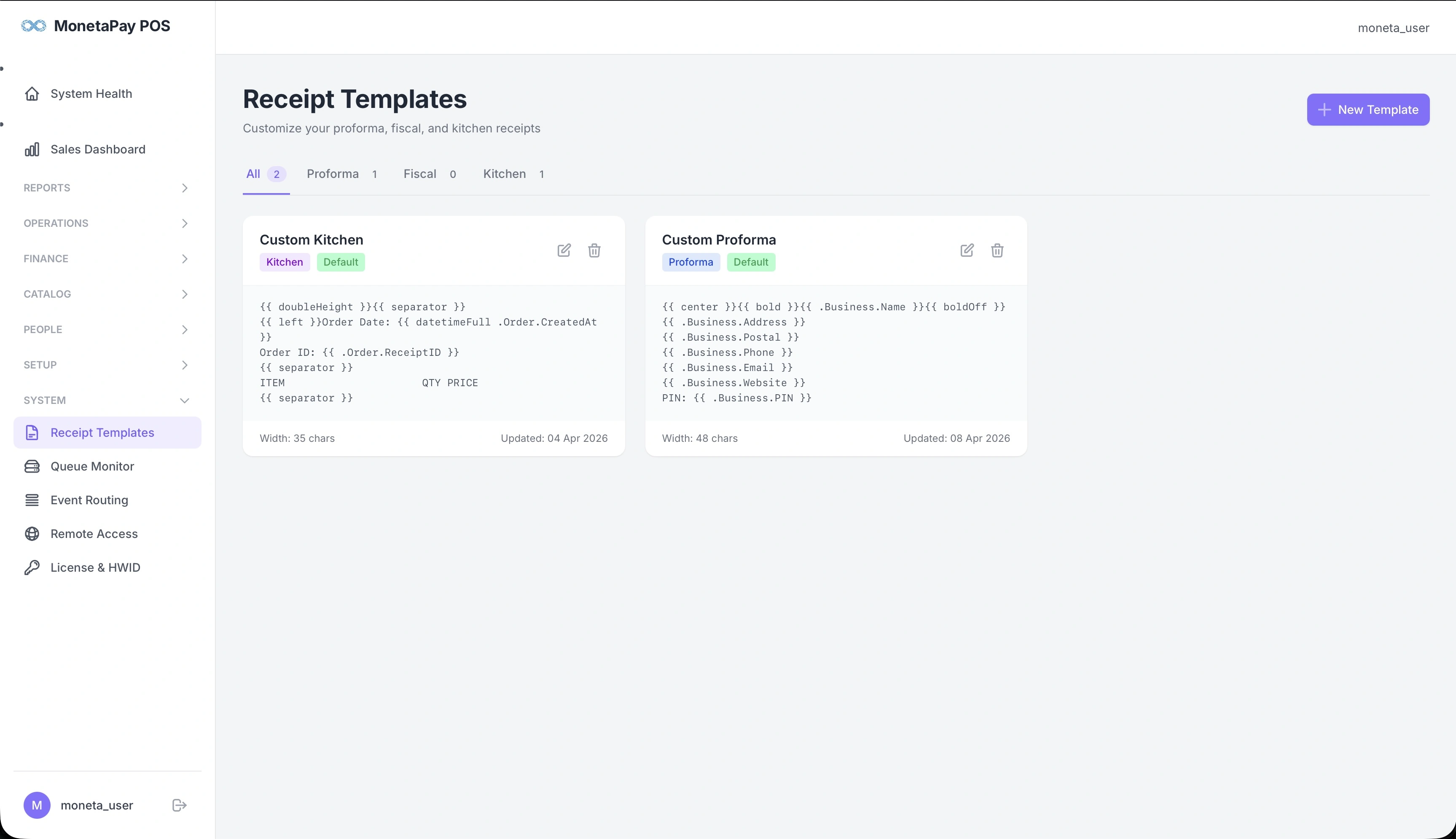
Filter templates by type using the tabs at the top:
- All — show all templates
- Proforma — customer bill templates (before payment)
- Fiscal — tax-compliant fiscal receipt templates
- Kitchen — kitchen ticket templates
Each template card shows:
- Name — template name
- Type badges — Kitchen, Proforma, Fiscal, and Default indicator
- Template preview — the template code with formatting tags
- Width — print width in characters
- Last updated — when the template was last modified
- Actions — edit or delete
Editing Templates
Click the edit icon on any template to open the template editor:
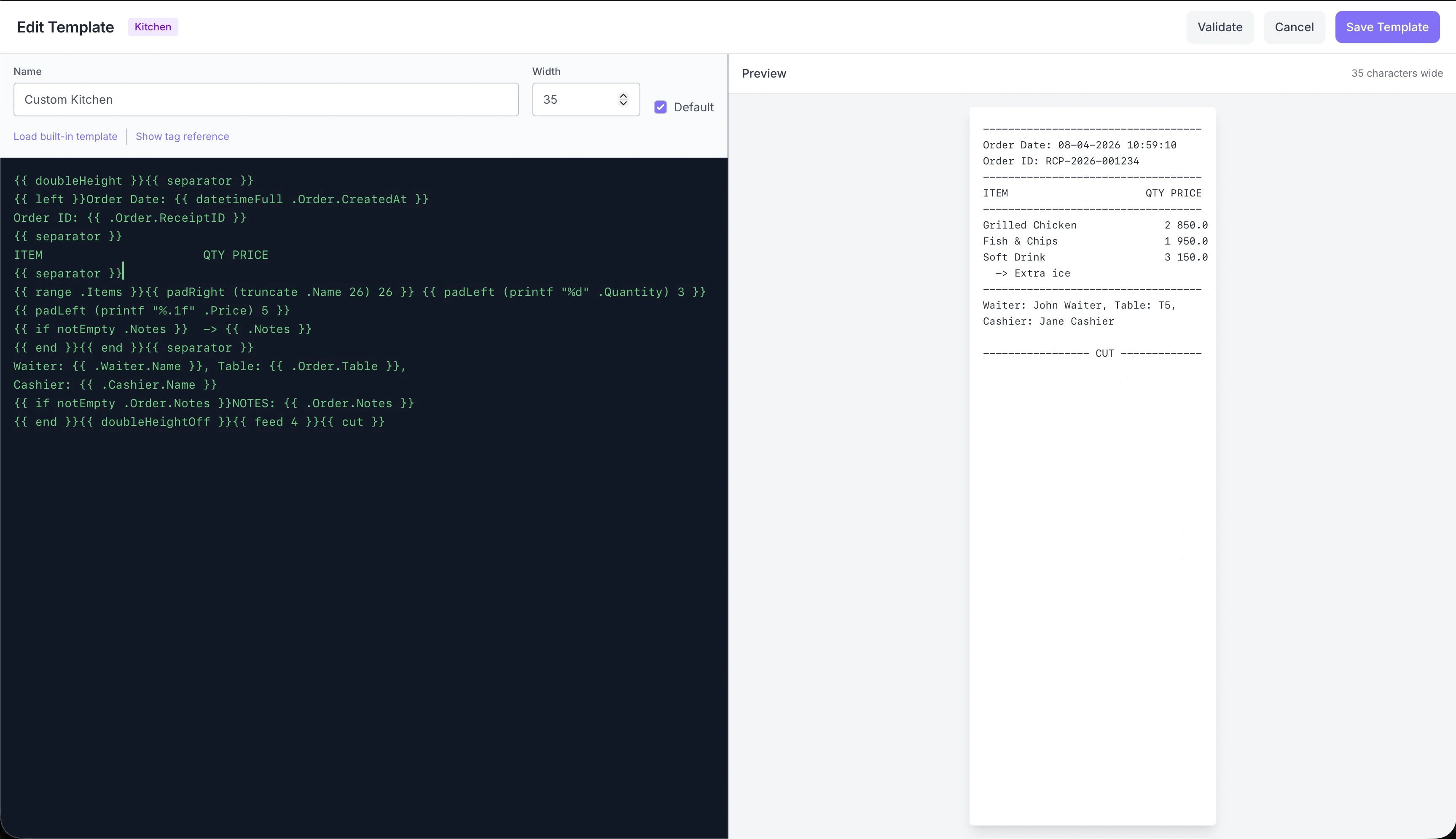
The editor has two panels:
- Left panel — template code with formatting tags
- Right panel — live preview showing how the receipt will look when printed
Editor Controls
| Control | Description |
|---|---|
| Name | Template name |
| Width | Print width in characters (typically 35 or 48) |
| Default | Set as the default template for this type |
| Load built-in template | Reset to the system default template |
| Show tag reference | Display available formatting tags |
| Validate | Check the template for errors |
| Save Template | Save changes |
TIP
Changes take effect immediately for all subsequent prints — no restart needed. Test your changes by reprinting a recent order from the Orders page.
Quick Reference
How do I make text bold?
{{ bold }}This text is bold{{ boldOff }}How do I center text?
{{ center }}This line is centered
{{ left }}Back to left-aligned
How do I make text larger?
{{ doubleHeight }}LARGE TEXT{{ doubleHeightOff }}
{{ doubleWidth }}WIDE TEXT{{ doubleWidthOff }}
How do I print a separator line?
{{ separator }}
{{ doubleSep }}
separator prints dashes (------------------), doubleSep prints equals signs (==================).
Template Syntax
Templates use {{ }} tags for dynamic content and formatting commands. Anything outside the tags is printed as-is.
Displaying Data
Access order, business, and item data using dot notation:
{{ .Business.Name }}
{{ .Order.ReceiptID }}
{{ .Waiter.Name }}
Loops
Print each item in the order:
{{ range .Items }}
{{ .Name }} x{{ .Quantity }}  {{ currency .Total }}
{{ end }}
Conditionals
Show content only when a condition is met:
{{ if notEmpty .Order.Notes }}
Notes: {{ .Order.Notes }}
{{ end }}
Text Formatting
| Command | Effect |
|---|---|
{{ bold }} | Start bold text |
{{ boldOff }} | End bold text |
{{ center }} | Center-align subsequent lines |
{{ left }} | Left-align subsequent lines |
{{ right }} | Right-align subsequent lines |
{{ doubleHeight }} | Double-height text (for kitchen visibility) |
{{ doubleHeightOff }} | Normal height |
{{ doubleWidth }} | Double-width text |
{{ doubleWidthOff }} | Normal width |
TIP
Alignment and size commands affect all lines that follow until changed. Remember to turn off bold/doubleHeight when you're done.
Layout Helpers
Two-Column Row
Print a label on the left and a value on the right:
{{ row "Total" (currency .Order.TotalDue) }}Output: Total 1,234.56
Three-Column Row
{{ row3 "Left" "Center" "Right" }}Centered Text
{{ centerText "RECEIPT" }}Separator Lines
{{ separator }}
{{ doubleSep }}
Padding and Truncation
Align columns precisely:
{{ padRight (truncate .Name 20) 20 }} {{ padLeft (printf "%d" .Quantity) 3 }}| Function | Description | Example |
|---|---|---|
padRight text width | Pad text with spaces on the right | padRight "Chicken" 20 → "Chicken " |
padLeft text width | Pad text with spaces on the left | padLeft "150" 8 → " 150" |
truncate text length | Shorten text with "..." if too long | truncate "Grilled Chicken Breast" 15 → "Grilled Chic..." |
Number and Date Formatting
Currency
{{ currency .Order.TotalDue }}Formats with commas and two decimals: 1,234.56
Dates and Times
| Function | Format | Example Output |
|---|---|---|
date .Order.CreatedAt | DD/MM/YYYY | 07/04/2026 |
time .Order.CreatedAt | HH:MM:SS | 14:30:00 |
datetime .Order.CreatedAt | DD/MM/YYYY HH:MM | 07/04/2026 14:30 |
datetimeFull .Order.CreatedAt | DD-MM-YYYY HH:MM:SS | 07-04-2026 14:30:00 |
datetime12 .Order.CreatedAt | DD/MM/YYYY hh:mm:ss AM | 07/04/2026 02:30:00 PM |
Printf Formatting
For precise number formatting:
{{ printf "%.2f" .Order.Tax }}     → 123.45
{{ printf "%d" .Quantity }}        → 3
{{ printf "%.0f" .Order.TotalDue }} → 1235
Graphics
QR Code
{{ qrcode .Fiscal.QRData }}Prints a QR code that customers can scan (used on fiscal receipts for tax authority verification).
Barcode
{{ barcode .Order.ReceiptID }}Prints a CODE39 barcode of the given text.
Printer Control
| Command | Effect |
|---|---|
{{ feed 2 }} | Feed 2 blank lines |
{{ cut }} | Cut the paper |
{{ init }} | Reset printer to defaults |
A typical receipt ends with:
{{ feed 2 }}{{ cut }}Available Variables
Order
| Variable | Type | Description |
|---|---|---|
.Order.ID | number | Internal order ID |
.Order.ReceiptID | text | Receipt number (e.g., "RCP-2026-001234") |
.Order.CreatedAt | timestamp | When the order was placed |
.Order.Table | text | Table number or name |
.Order.Notes | text | Order-level notes |
.Order.PaymentMethod | text | "cash", "mpesa", "card" |
.Order.MpesaCode | text | M-PESA transaction reference |
.Order.Subtotal | number | Items total before discounts |
.Order.BaseTotal | number | Total excluding tax |
.Order.Tax | number | VAT amount |
.Order.CTL | number | Catering Training Levy |
.Order.Discount | number | Discount applied |
.Order.TotalDue | number | Final amount to pay |
Business
| Variable | Type | Description |
|---|---|---|
.Business.Name | text | Restaurant name |
.Business.Address | text | Physical address |
.Business.Postal | text | P.O. Box |
.Business.Phone | text | Phone number |
.Business.Email | text | Email address |
.Business.Website | text | Website URL |
.Business.PIN | text | Tax PIN |
.Business.VATRate | number | VAT rate (e.g., 0.16) |
.Business.CTLRate | number | CTL rate (e.g., 0.02) |
.Business.Footer | text | Custom footer message |
Staff
| Variable | Type | Description |
|---|---|---|
.Waiter.Name | text | Waiter's name |
.Cashier.Name | text | Cashier's name |
Items (use inside {{ range .Items }})
| Variable | Type | Description |
|---|---|---|
.Name | text | Menu item name |
.Code | text | Item code |
.Quantity | number | Quantity ordered |
.Price | number | Unit price |
.Total | number | Line total (qty x price) |
.Notes | text | Item-level notes / modifiers |
.Vatable | boolean | Whether item is taxable |
.Category | text | Menu category |
Fiscal (for fiscal receipts)
| Variable | Type | Description |
|---|---|---|
.Fiscal.Code | text | Fiscal device code |
.Fiscal.QRData | text | Verification URL for QR code |
.Fiscal.InvoiceNo | text | Fiscal invoice number |
.Fiscal.Timestamp | text | Fiscal signing timestamp |
Other
| Variable | Type | Description |
|---|---|---|
.Now | timestamp | Current date and time |
.Printer.Name | text | Printer name |
Math and Comparison
| Function | Description | Example |
|---|---|---|
add a b | Addition | {{ add .Order.BaseTotal .Order.Tax }} |
sub a b | Subtraction | {{ sub .Order.Subtotal .Order.Discount }} |
mul a b | Multiplication | {{ mul .Price .Quantity }} |
div a b | Division (safe) | {{ div .Order.Tax .Order.Subtotal }} |
String Functions
| Function | Description |
|---|---|
upper text | UPPERCASE |
lower text | lowercase |
title text | Title Case |
trim text | Remove leading/trailing whitespace |
repeat text n | Repeat text n times |
Full Example: Custom Proforma Receipt
Here's a complete custom receipt template showing common patterns:
{{ center }}{{ bold }}{{ doubleHeight }}{{ .Business.Name }}{{ doubleHeightOff }}{{ boldOff }}
{{ .Business.Address }}
{{ .Business.Phone }}
{{ separator }}
{{ left }}{{ datetime .Order.CreatedAt }}
Receipt: {{ .Order.ReceiptID }}
Table: {{ .Order.Table }}
{{ doubleSep }}
{{ bold }}ITEM                     QTY    PRICE AMOUNT{{ boldOff }}
{{ separator }}
{{ range .Items }}{{ padRight (truncate .Name 24) 24 }} {{ padLeft (printf "%d" .Quantity) 3 }} {{ padLeft (printf "%.2f" .Price) 8 }} {{ padLeft (printf "%.2f" .Total) 7 }}{{ if .Vatable }} C{{ end }}
{{ if notEmpty .Notes }}  -> {{ .Notes }}
{{ end }}{{ end }}{{ doubleSep }}
{{ bold }}{{ row "TOTAL" (currency .Order.TotalDue) }}{{ boldOff }}
{{ separator }}
VAT 16%: {{ printf "%.2f" .Order.Tax }}
CTL  2%: {{ printf "%.2f" .Order.CTL }}
{{ separator }}
Served by: {{ .Waiter.Name }}
Cashier: {{ .Cashier.Name }}
{{ separator }}
{{ center }}{{ .Business.Footer }}
{{ feed 2 }}{{ cut }}
Tips
- Paper width: Standard 80mm thermal printers fit 48 characters per line (Font A). Plan your column layouts accordingly.
- Preview first: Use the Preview button in the dashboard template editor to see how your template renders before saving.
- Validate: The editor checks your template syntax before saving — fix any errors shown.
- Item column alignment: Use
padRightfor left-aligned columns andpadLeftfor right-aligned numbers. Combine withtruncateto prevent long names from breaking the layout. - C marker: The
{{ if .Vatable }} C{{ end }}pattern marks taxable items with a "C" — a common convention on fiscal receipts. - Kitchen tickets: Use
{{ doubleHeight }}for kitchen templates so cooks can read orders from a distance.