
Event Routing
Configure how system events are routed to processing queues.
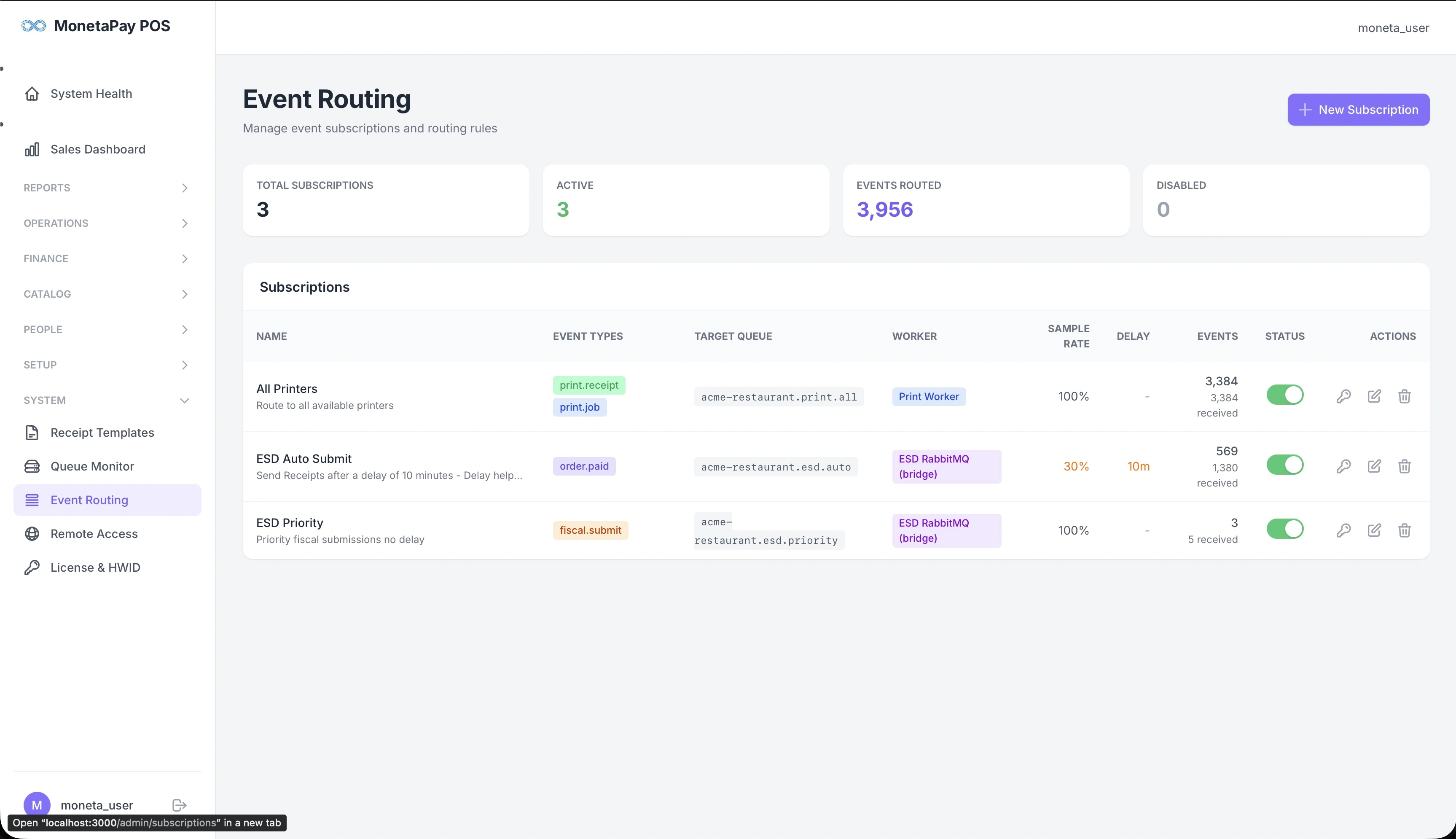
Overview
Event Routing controls how system events (order placed, order paid, print request) are directed to the appropriate processing queues. This powers the automation layer — printing receipts, submitting fiscal data, and triggering integrations.
TIP
This page is available to Admin users only. Most restaurants won't need to change the default routing rules.
What You'll See
Summary Cards
| Card | What It Shows |
|---|---|
| Total Subscriptions | Number of routing rules |
| Active | Currently enabled rules |
| Events Routed | All-time count of events processed |
| Disabled | Inactive rules |
Subscriptions Table
| Column | Description |
|---|---|
| Name | Descriptive name and description |
| Event Types | Which events trigger this rule (shown as colored tags) |
| Target Queue | Where matched events are sent for processing |
| Worker | Which worker processes the queue |
| Sample Rate | Percentage of events to process (100% = all) |
| Delay | Wait time before processing |
| Events | Count of events received (total and routed) |
| Status | On/off toggle |
| Actions | Edit, duplicate, or delete |
Built-in Routing Rules
| Rule | Event Types | What It Does |
|---|---|---|
| All Printers | print.receipt, print.job | Routes all print events to the print queue at 100% rate |
| ESD Auto Submit | order.paid | Samples paid orders for automatic fiscal submission with a configurable delay (e.g., 10 minutes) |
| ESD Priority | fiscal.submit | Immediate fiscal submission at 100% rate for manually triggered submissions |
Sample Rate and Delay
- Sample Rate — controls what percentage of matching events are processed. For fiscal compliance, this should be 100%. For testing, you might lower it temporarily.
- Delay — how long to wait before processing. The ESD Auto Submit rule uses a delay (e.g., 10 minutes) to allow time for voids and corrections before submitting to the tax authority.
Creating Custom Rules
Click + New Subscription to create a custom routing rule. This allows advanced configurations like routing high-value orders to a separate printer or triggering notifications.
When creating a rule, you can add a Filter Expression to match only specific events. Filters use CEL (Common Expression Language) syntax.
Filter Expressions (CEL)
Filter expressions let you route only events matching certain conditions. The expression must evaluate to true or false.
Available variables:
| Variable | Type | Description |
|---|---|---|
event | map | The event data payload (fields vary by event type) |
event_type | string | The event type (e.g., "order.paid", "print.job") |
business_id | int | Your business ID |
timestamp | timestamp | When the event was created |
source | string | The POS hostname that created the event |
Example filters:
| Expression | What It Does |
|---|---|
event.total_due >= 10000 | Only orders above KES 10,000 |
event.payment_method == "mpesa" | Only M-PESA payments |
event.items_count > 5 | Only orders with more than 5 items |
event.source.endsWith("reception") | Only events from the reception terminal |
event.total_due >= 5000 && event.payment_method == "cash" | Cash payments above KES 5,000 |
Available operators:
| Operator | Description |
|---|---|
==, != | Equal, not equal |
>=, <=, >, < | Comparison |
&&, ||, ! | AND, OR, NOT |
startsWith(), endsWith(), contains() | String matching |
+, -, *, / | Math operations |
Validate First
Use the Validate button in the subscription editor to check your filter expression before saving.
WARNING
Modifying or disabling the default routing rules can stop printing or fiscal submissions. Only change these if you understand the impact. Contact support if unsure.