
Financial Analysis (Expenses & Cash)
Daily cash flow — expenses, deposits, float tracking, and cash reconciliation.
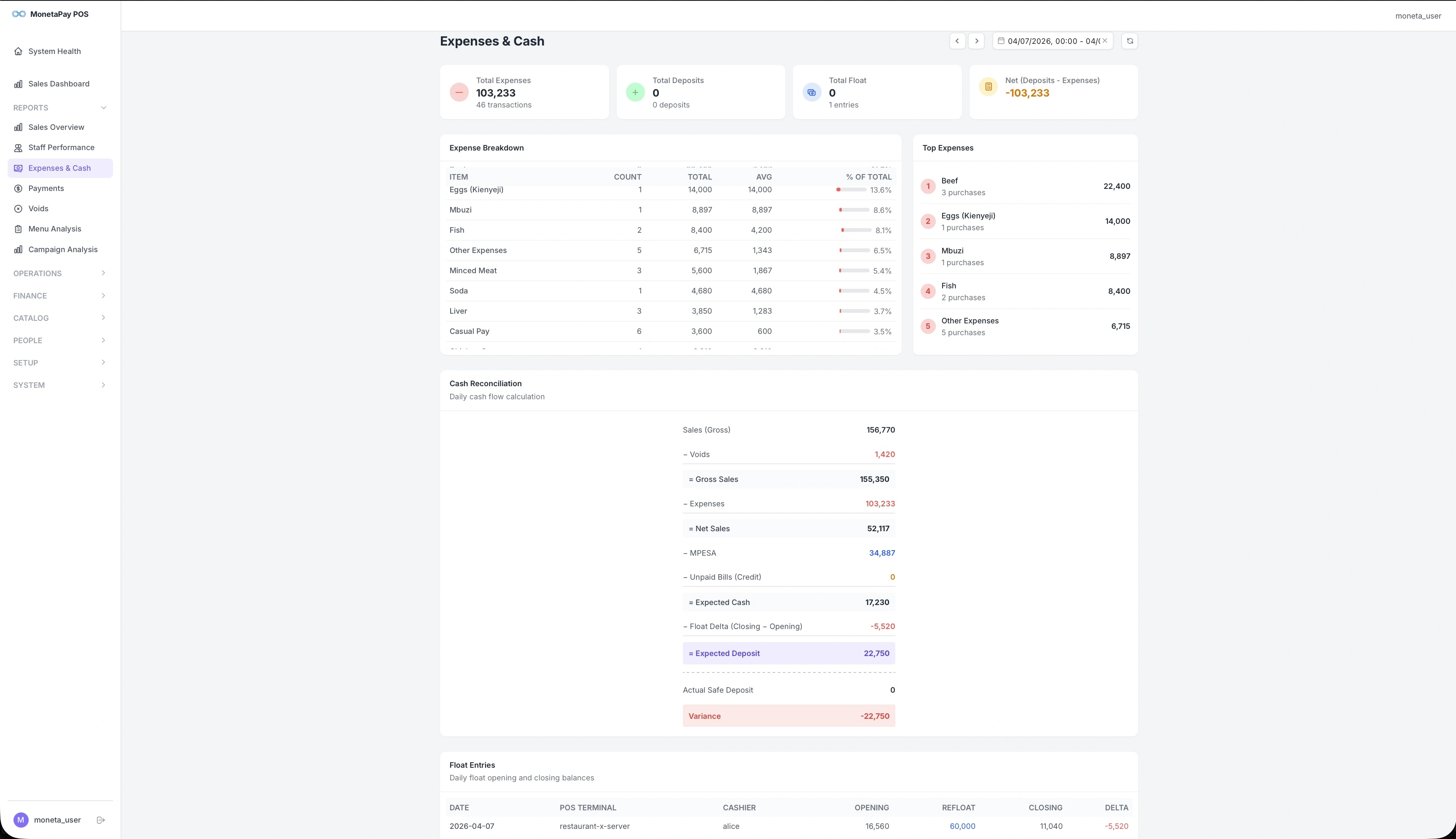
Overview
This page answers the question every restaurant owner asks at end of day: "Where did the money go?" It tracks every expense, every deposit, and calculates exactly how much cash should be in the till.
Use this page to:
- Review all expenses for the day
- Verify that cash deposits match what's expected
- Catch discrepancies early with the cash reconciliation calculation
- Track float (opening cash) across terminals and shifts
TIP
This page is available to Admin users only.
What You'll See
Summary Cards
| Card | What It Shows |
|---|---|
| Total Expenses | Sum of all expenses with transaction count |
| Total Deposits | Cash deposited to safe or bank |
| Total Float | Opening cash float with entry count |
| Net (Deposits − Expenses) | Quick indicator — green means deposits exceed expenses |
Expense Breakdown
A table listing every expense category with:
- Item — expense description (e.g., Eggs, Beef, Soda, Casual Pay)
- Count — number of purchases
- Total — amount spent
- Avg — average per purchase
- % of Total — visual bar showing proportion of total expenses
The Top Expenses sidebar ranks your biggest expense categories by total value. Use this to monitor food costs and spot unusual spending patterns.
Cash Reconciliation
The most important section on this page. It walks through a step-by-step cash flow calculation:
  Sales (Gross)
− Voids
= Gross Sales
− Expenses
= Net Sales
− MPESA
− Unpaid Bills (Credit)
= Expected Cash
− Float Delta
= Expected Deposit

  Actual Safe Deposit
  Variance
A Variance of zero means everything balances perfectly. A non-zero variance means the physical cash count doesn't match what's expected — this warrants immediate investigation.
WARNING
A negative variance means there's less cash than expected. Common causes: unrecorded expense, miscounted float, or unreported breakage. Investigate the same day while details are fresh.
Float Entries
A table showing cash float records for each terminal and shift:
| Column | Description |
|---|---|
| Date | Entry date |
| POS Terminal | Which terminal |
| Cashier | Who managed the float |
| Opening | Starting cash balance |
| Refloat | Any cash added during the shift |
| Closing | End-of-shift cash count |
| Delta | Difference (color-coded — red if negative) |